

Channels
Outbound services
في هذه الصفحة
An outbound service registers the SIP trunk Nabrah uses to send calls to a client PBX or carrier. Once created, you can trigger outbound calls through the dashboard or the API, and the calls route through this trunk.
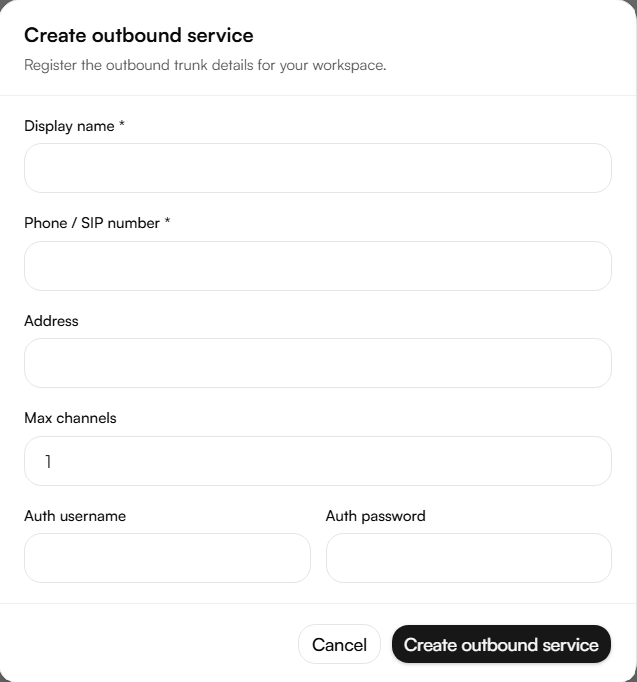
Creating an outbound service
Navigate to Channels → Outbound services and click Create.
Display name a label to identify this trunk in the dashboard.
Phone / SIP number the number or SIP identifier associated with this trunk.
Address the destination IP or domain supplied by the provider. Use host:port when the provider uses a non-default port; otherwise port 5060 is assumed.
Max channels the concurrent call limit. Set this according to your provider contract or commercial limit to avoid exceeding capacity.
Auth username / Auth password required when the provider uses username/password authentication. For IP authentication instead, confirm that the provider has whitelisted pbx.nabrah.ai:5060 or Nabrah's current public IP.
Click Create outbound service, then run a test call before going live
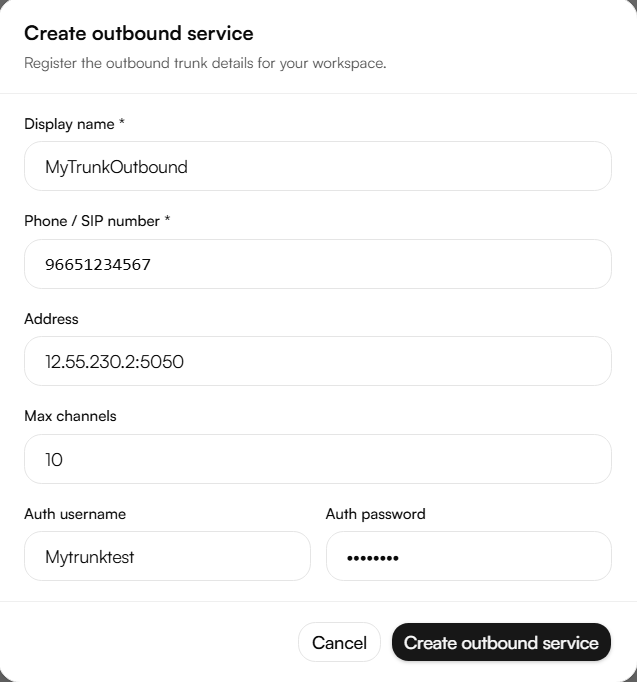
Information to gather before provisioning
Before creating the service, collect this information from the client/provider. Passwords should be exchanged over a secure channel never plain email.
General request information
Customer / company name
Technical contact name and email/phone
Environment Production, Staging, or Test
Preferred service display name example: CustomerName-Outbound-Prod
Phone / SIP number(s) / DID list country code format where possible, e.g. 96651234567
Required codecs example: PCMU, PCMA
Planned go-live date and time zone
Outbound-specific information
Destination PBX/provider IP or domain required for all auth types. Example: 12.55.230.2 or sip.provider.com.
Destination SIP port required for all auth types. Default is 5060 unless the provider uses another port.
Transport required by destination UDP or TCP.
Authentication type expected by provider IP only, username/password only, or both.
Auth username Nabrah must use required for username/password or both. Provider-supplied SIP username.
Auth password delivery method required for username/password or both. Use a secure portal or secret manager never share in plain documents unless approved.
Provider realm/domain (if required) needed by some SIP Digest providers.
Maximum concurrent channels required for all auth types. Must match the commercial/provider limit.
Allowed caller ID / CLI format required for all auth types. Confirm which caller IDs the provider accepts.
Destination number format required for all auth types. Example: 00 + country code, E.164, or national format.
Failover destination IP/domain optional, only if the provider supports failover.
Client/provider whitelist requirement required for IP-only or both. Whitelist Nabrah's SBC/PBX: pbx.nabrah.ai:5060. Nabrah can confirm its current public IP if the provider requires an IP instead of DNS.
Do not create the trunk in production until this information is complete and the authentication type is clear. Missing destination details, wrong ports, or wrong number formats are the most common causes of SIP 403, 404, and timeout errors.
Authentication type
IP only the provider accepts calls only from Nabrah's whitelisted source IP/domain. Best for carrier interconnects with fixed public IPs and no Digest requirement.
Username / password only Nabrah authenticates to the provider using SIP Digest credentials. Best when the provider requires auth or Nabrah's source IP can change.
Both the provider whitelists Nabrah and still requires Digest credentials. Recommended for production whenever the provider supports it.
Using both methods reduces fraud risk an attacker would need both the correct source path and the correct credentials.
Field format rules
12.55.230.2 host with no port; the default SIP port (5060) is used.
12.55.230.2:5060 host with an explicit default port.
sip.provider.com:5061 domain with a custom port.
No spaces before or after an IP, domain, or port.
Valid ports range from 1 to 65535. Nabrah's default is 5060.
Use a public IP for IP authentication unless a VPN or private link is in place.
If a domain is used instead of an IP, confirm how DNS updates are handled with the provider.
Prefer normalized digits for phone/SIP numbers country code plus number, no +, spaces, or dashes.
Outbound caller ID must be pre-approved by the provider unapproved caller IDs may be rejected or blocked.
Troubleshooting
These SIP message elements are the most useful when diagnosing a call that isn't connecting correctly.
Request-URI identifies the called service/number. A 404 Not Found usually means the number format is wrong.
Via / received / rport shows the real source IP and NAT behavior. A 403 Forbidden usually means the source IP differs from what's whitelisted.
Authorization appears after a 401/407 challenge for Digest auth. A 401/407 loop usually means the username, password, or realm is wrong.
Contact used for future requests; can expose private IPs. An unreachable Contact can cause ACK/BYE routing failures.
SDP c= and m= shows media IP and RTP ports. Wrong values here cause one-way or no audio.
Common issues
403 Forbidden wrong source IP, trunk disabled, or auth blocked. Compare the real source IP in Via/received with what's whitelisted.
401/407 loop Digest username, password, or realm mismatch. Verify username, auth username, password, and provider realm.
404 Not Found phone/SIP number doesn't match a route. Check the Request-URI and To header.
408 Timeout wrong address/port, firewall, or the provider is down. Check the destination address, port, and firewall rules.
488 / 415 codec or SDP mismatch. Check the offered codecs and media policy.
One-way audio RTP/NAT path issue. Check SDP c= IP, RTP ports, and the media path.
Max channels reached the concurrent call limit is full. Check Max channels against active calls.
Test plan
Verify the collected information: destination address, port, transport, number format, authentication type, and max channels.
Confirm firewall rules for SIP signaling and RTP media.
Run one outbound test call.
Confirm the response code and, if applicable, the Authorization header.
Confirm two-way audio, and record the test call time, caller, called number, and trunk name.
Security checklist
Prefer Both authentication for production trunks when supported.
Use unique SIP credentials per customer/trunk.
Never send SIP passwords in plain email use a secure channel.
Whitelist only the IPs actually required, and remove old IPs after migration.
Keep Max channels aligned with the commercial and fraud-risk limit.
Disable inactive trunks and review trunk usage regularly.