

Nabrah Agents
Nabrah Agents overview
On this page
Nabrah Agents
Nabrah Agents turns a single AI voice agent into a full customer-conversation team. Build it once, then deploy it across phone calls, WhatsApp, and the web with every interaction recorded, analyzed, and ready to act on.
Platform capabilities
From setup to deployment to monitoring, Nabrah Agents provides everything you need to run AI voice agents at scale.
Configure
Goal | Where | Description |
|---|---|---|
Create and configure an agent | Build → Agents | Define identity, persona, voice, language, and conversation workflow |
Add knowledge to your agent | Build → Agents → Knowledge | Paste reference material the agent treats as ground truth during calls |
Connect tools to your agent | Build → Custom Tools | Enable the agent to call external APIs and business systems during calls |
Extract data from calls | Build → Analysis Groups | Define structured data points to capture from every interaction |
Automate post-call tasks | Build → Follow-ups | Create messages or actions triggered automatically after a call ends |
Deploy
Goal | Where | Description |
|---|---|---|
Receive incoming calls | Channels → Inbound Services | Connect a phone number to your agent via SIP trunk |
Make outgoing calls | Channels → Outbound Services | Configure your agent to initiate calls programmatically or on-demand |
Deploy on WhatsApp | Engagement → WhatsApp | Run the same agent across WhatsApp messaging |
Embed on your website | Studio → Plugins → Web-Call Widget | Add a voice interface directly to any web page |
Integrate via API | Developers → API Reference | Trigger calls and manage agents programmatically |
Monitor
Goal | Where | Description |
|---|---|---|
Track call performance | Workspace → Calls Analytics | Monitor volume, duration, success rate, and missed calls |
Track WhatsApp performance | Workspace → WhatsApp Analytics | Monitor WhatsApp conversation metrics |
Review individual calls | Engagement → Call Logs | Access transcripts, recordings, sentiment, and accuracy scores |
Manage customer requests | Engagement → Ticketing | Create and track support tickets generated from call outcomes |
View and search contacts | Engagement → Contacts | Browse the people your agents interact with |
Architecture
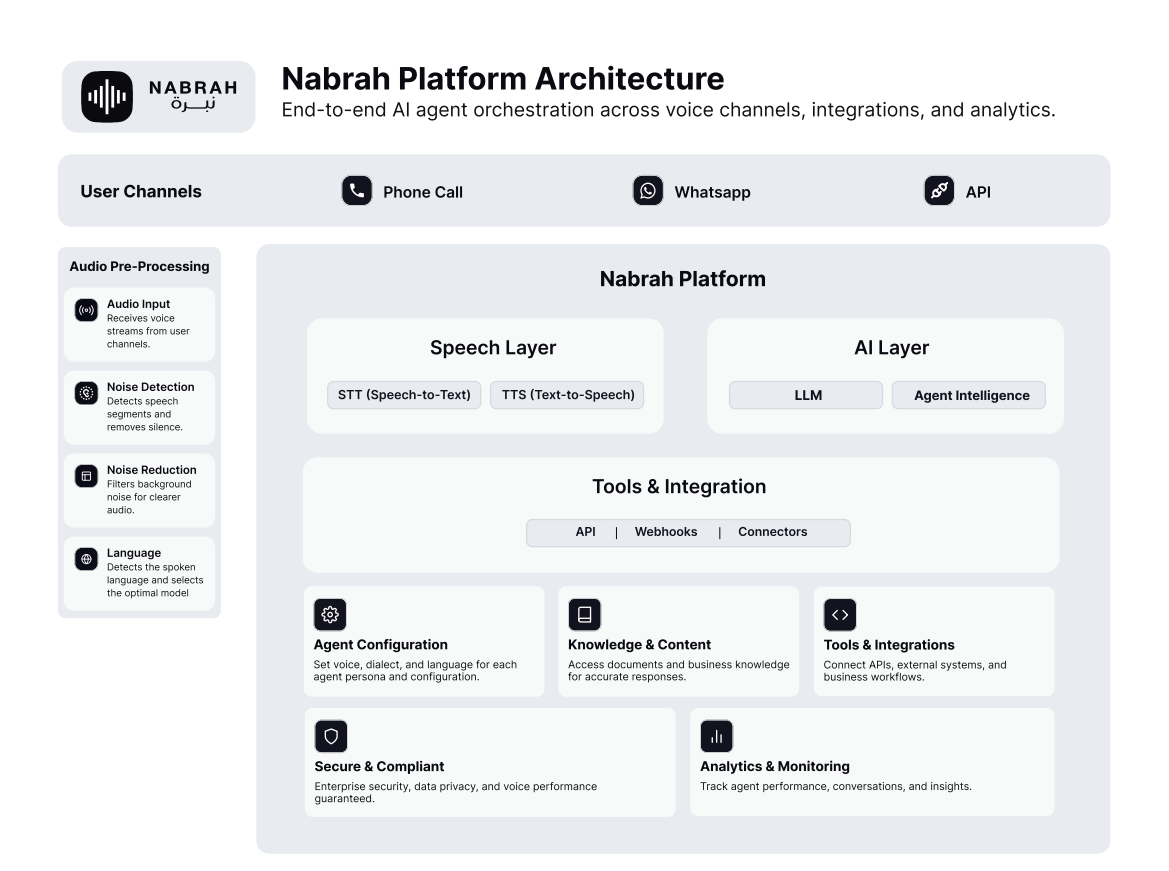
Nabrah Agents coordinates four core components on every call:
Audio Pre-Processing noise detection, noise reduction, and language identification before the audio reaches the AI layer.
Speech to Text (STT) converts caller speech into structured text, with dialect detection for Najdi, Hijazi, and Eastern Arabic.
LLM & Agent Intelligence processes the transcript through safety guardrails, applies your agent's identity and knowledge, and generates a response.
Text to Speech (TTS) converts the response into natural Arabic audio with dialect-aware synthesis and emotion control, then streams it to the caller.
Supported languages
Nabrah Agents supports nine languages. Arabic is enabled by default on every agent.
Arabic, English, Urdu, Malay, French, German, Spanish, Turkish, Indonesian.