
Telephony
Inbound services
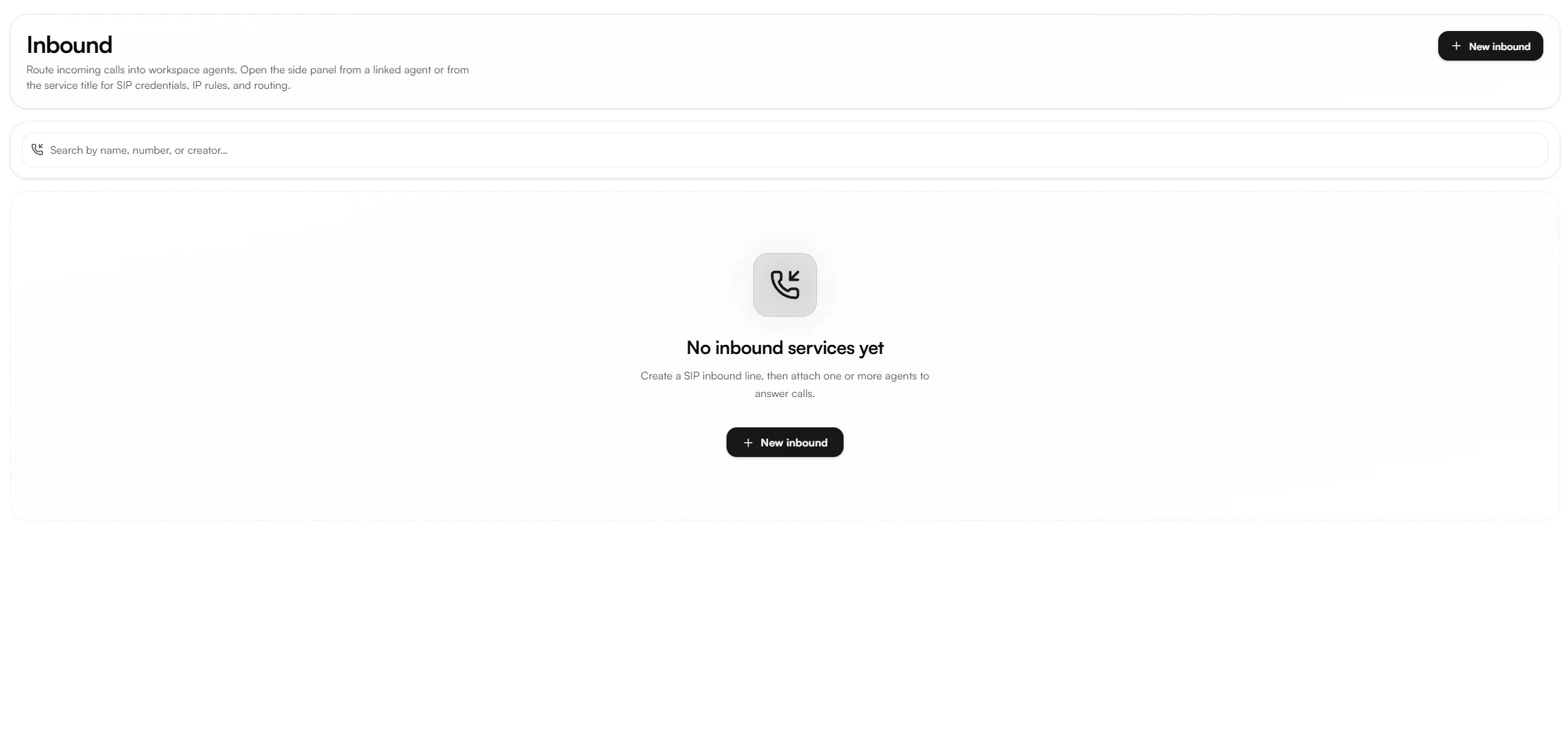
An inbound service routes incoming calls into your workspace and connects them to a linked agent. Creating one registers a SIP trunk that Nabrah accepts calls from, and then links one or more agents to handle those calls.
Nabrah connection values
To send calls to Nabrah, your provider or PBX must send SIP signaling to:
pbx.nabrah.ai:5060The default SIP port is 5060. Use a different port only if explicitly agreed with Nabrah. The inbound SIP URI format is:
sip:<PHONE_OR_DID>@pbx.nabrah.ai:5060Parameter | Value |
|---|---|
Nabrah SBC/PBX domain |
|
Default SIP port | 5060 |
Inbound SIP URI format | sip:<PHONE_OR_DID>@pbx.nabrah.ai:5060 |
Authentication options | IP only / username-password only / both |
Transport | UDP (default), TCP, or TLS. Confirm with Nabrah before go-live |
Information to gather before provisioning
Before creating the service, collect this information from the customer's technical contact or SIP provider. Share passwords over a secure channel, never by plain email.
General request information
Item | Notes |
|---|---|
Customer / company name | |
Technical contact name and email/phone | |
Environment | Production, Staging, or Test |
Preferred service display name | Example: |
Phone / SIP number(s) / DID list | Use country code format where possible, e.g. |
Required codecs | Example: PCMU, PCMA |
Planned go-live date and time zone |
Inbound-specific information
Item | Required for which auth type | Notes |
|---|---|---|
Remote PBX/provider public source IP(s) | IP only / Both | Add every signaling IP used |
Remote SIP source port | IP only / Both | Default 5060 note if custom |
Remote signaling domain (if used) | Optional | Must resolve to the real source IP |
Authentication type requested | All | IP only, username/password only, or both |
Auth username the remote side will use | Username/password / Both | Case-sensitive, no spaces |
Auth password delivery method | Username/password / Both | Use a secure portal or secret manager, never plain email |
Caller ID format sent by provider | All | E.164 without |
Called number / DID format sent to Nabrah | All | Example: |
Routing target after Nabrah receives the call | All | Agent, AI agent, queue, extension, or other destination |
Failover behavior expected | Optional | Example: second agent group, voicemail, or reject |
Do not create the trunk in production until this information is complete and the authentication type is clear. Missing source IPs, wrong ports, or wrong number formats are the most common causes of SIP 403, 404, and timeout errors.
Creating an inbound service
Open Agents → Telephony → Inbound services and click New inbound.
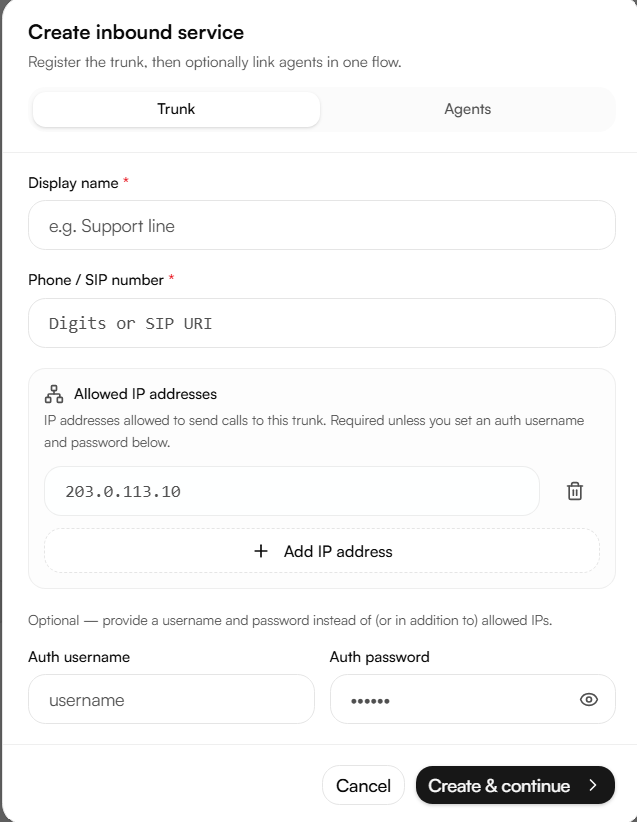
The Create inbound service dialog has two tabs: Trunk and Agents.
Trunk tab
Display name a name that identifies the customer, direction, and environment, for example CustomerName-Inbound-Prod.
Phone / SIP number the number or DID received in the SIP Request-URI or To header. Use digits only: country code plus number, with no spaces or symbols, for example 96651234567.
Transport protocol the SIP signaling transport: UDP, TCP, or TLS. UDP is the default; choose TLS for encrypted signaling.
Allowed IP addresses required unless an auth username and password are set instead. Add the provider's public source IP. If the provider uses a non-default port, enter it as IP:port; otherwise port 5060 is assumed.
Auth username / Auth password required unless IP authentication is used instead. These are the credentials the remote side authenticates with when sending calls to Nabrah.
To use both authentication methods, fill in both the allowed IPs and the credentials.
Click Create & continue to move to the Agents tab.
Agents tab
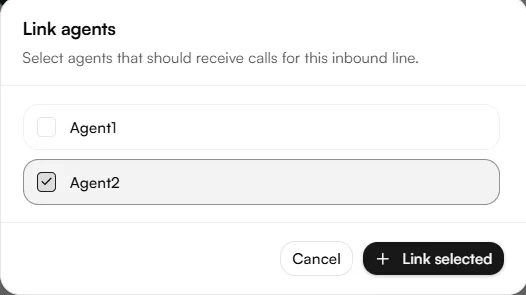
Link one or more agents to answer calls on this trunk now and click Link agents, or click Skip for now and attach them later from the trunk's side panel.
Editing after creation
Once created, a trunk's SIP credentials and IP rules can be reviewed, and its linked agents changed, from its side panel, opened either from a linked agent or by clicking the service's title in the Inbound services list.
The side panel shows the Dialed number, Transport, Allowed IPs, and SIP credentials, and lists the Linked agents. Click Link agents to add agents, Unlink to stop routing calls to one, or Delete service to remove the trunk. If agents are still linked, Nabrah removes those links first.
Authentication type
Type | How it works | When to use |
|---|---|---|
IP only | Nabrah accepts calls only from the configured source IPs | Carrier interconnects with fixed public IPs and no Digest requirement |
Username / password only | The remote side authenticates using SIP Digest credentials | The source IP can change, or the provider requires authentication |
Both | Source IP must match and Digest credentials must pass | Recommended for production whenever the remote system supports it |
Using both methods reduces fraud risk. An attacker would need both the correct source IP and the correct credentials.
Field format rules
Input example | Meaning | Stored host | Stored port |
|---|---|---|---|
| Host with no port — default SIP port is used |
|
|
| Host with explicit default port |
|
|
| Domain with custom port |
|
|
No spaces before or after an IP, domain, or port.
Valid ports range from 1 to 65535. Nabrah's default is 5060.
Use a public IP for IP authentication unless a VPN or private link is in place.
If a domain is used instead of an IP, confirm how DNS updates are handled with the provider.
Use digits only for phone/SIP numbers: country code plus number, with no
+, spaces, or dashes.Outbound caller ID (when this trunk is used for return traffic) must be pre-approved by the provider.
Troubleshooting
These SIP message elements are the most useful when diagnosing a call that isn't routing or connecting correctly.
SIP item | Why it matters | Typical issue |
|---|---|---|
Request-URI | Identifies the called service/number |
|
Via / received / rport | Shows the real source IP and NAT behavior |
|
Authorization | Appears after a 401/407 challenge for Digest auth | 401/407 loop when username, password, or realm is wrong |
Contact | Used for future requests; can expose private IPs | ACK/BYE routing failure if Contact is unreachable |
SDP | Shows media IP and RTP ports | One-way audio or no audio |
Common issues
Symptom / SIP code | Most likely cause | First check |
|---|---|---|
403 Forbidden | Wrong source IP or auth blocked | Compare the real source IP in Via/received with Allowed IP |
401/407 loop | Digest username, password, or realm mismatch | Verify username, auth username, password, and provider realm |
404 Not Found | Phone/SIP number doesn't match a route | Check the Request-URI and To header |
408 Timeout | Wrong address/port, firewall, or remote side down | Check address, port, and firewall rules |
One-way audio | RTP/NAT path issue | Check SDP |
Test plan
Verify the collected information: direction, IP/domain, port, number format, authentication type, and max channels.
Confirm firewall rules for SIP signaling and RTP media.
Run one inbound test call.
Confirm the source IP, Request-URI, From/To, response code, and Authorization header (if applicable).
Confirm two-way audio, and record the test call time, caller, called number, and trunk name.
Security checklist
Prefer Both authentication for production trunks when supported.
Use unique SIP credentials per customer/trunk.
Never send SIP passwords by plain email. Use a secure channel.
Whitelist only the IPs actually required, and remove old IPs after migration.
Delete inactive trunks and review trunk usage regularly.