

Build
Analysis groups
On this page
Jump to a section
An analysis group defines the structured data points that Nabrah extracts automatically from every call. Once linked to an agent, the platform captures these data points after each interaction and surfaces them in Calls Analytics and Call Logs.
Use analysis groups when you need to collect consistent, structured information across calls for example, tracking whether a caller was interested in a product, what issue they reported, or how they rated the interaction.
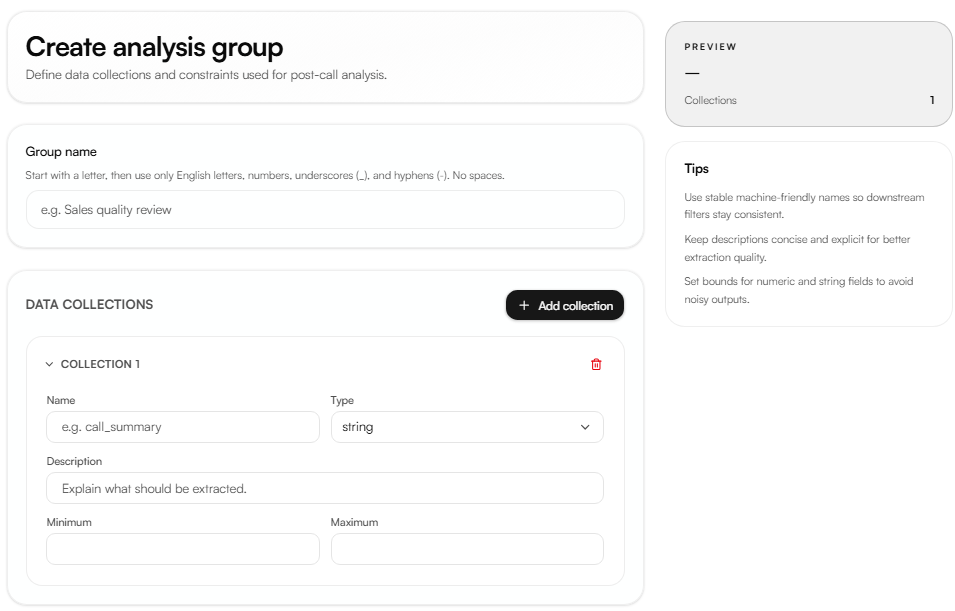
Creating an analysis group
Navigate to Build → Analysis groups and click Create group.
Group name
The name must start with a letter and use only English letters, numbers, underscores (_), and hyphens (-). No spaces are allowed.
Data collections
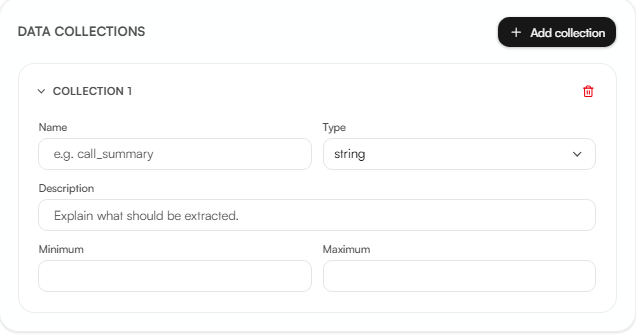
Each analysis group contains one or more data collections one per data point to extract.
Type determines what kind of value is captured:
Type | Description |
|---|---|
string | A text value, for example a reason or a quote |
boolean | A true or false value |
integer | A whole number |
number | A decimal number |
enum | One value from a defined list of options |
Description guides the AI on exactly what to extract from the conversation. Be specific vague descriptions lead to inconsistent extraction across calls.
Minimum / Maximum available for integer and number types only. Sets the acceptable value range. Not available for boolean. For enum, define the list of allowed values instead.
Linking to an agent
An analysis group must be linked to an agent to activate extraction. Open the agent and go to Tools & analysis in agent configuration. A single agent can use multiple analysis groups, and the same group can be reused across agents.
Viewing and exporting data
Captured data appears in two places:
Call logs → AI insights → User tab per-call breakdown of extracted values
Calls analytics → Agent analysis insights → User tab charts and distributions across all calls in the selected period
To export the full dataset, click Export CSV in Call Logs. The export includes Nabrah's built-in call metrics alongside your custom data points.